Why Can a Transfer Look Completed but the Recipient Still Hasn’t Received It? [2026]
It Says Successful—So Where’s the Money?
You complete a transfer on PDCard and the status shows Successful—but the recipient still cannot see the money. This can happen because the sending side and receiving side do not always finish processing at the same moment.
Key idea: a successful sending-side status does not always mean the recipient’s bank has already made the money available.
Successful can describe the sending side—not the final receiving stage.
When a PDCard transaction shows Successful, it generally means the transfer completed the relevant processing on the sending side.
Successful
PDCard or the sending-side process has completed its part.
Money not received yet
The receiving bank or payment network may still be processing or updating the transfer.
If you cannot find or understand your withdrawal status, see Can’t Find Your Withdrawal? Check Your PDCard Status First.
Several explanations are possible.
Receiving bank still processing: the bank may have the transfer but has not posted it to the available balance yet.
Transfer returned: the receiving bank may reject or return the payment because of account details, restrictions or bank rules.
Recipient details incorrect: a wrong account number, bank, tag, email or phone number can affect delivery.
Payment network updating: one system may finish before another system updates the transaction.

Interactive guide to trace a successful PDCard transfer that has not reached the recipient
The receiving bank may return the transfer.
A payment can appear successful from the sending side and still later require checking if the receiving bank rejects or returns it.
For related withdrawal issues, see PDCard Withdrawal Problems: Wrong Bank Details, Failed Withdrawals & How to Fix Them.
Check the destination before doing anything else.
Depending on the payment method, confirm the bank account number, bank name, recipient name, tag, email, phone number or other payment details.
“Not visible” does not always mean “not received.”
Some banks and payment services separate different parts of the account.
In uncommon cases, the transaction record may need review.
Most missing-payment situations can be explained by bank processing, returned transfers, recipient information or payment-network timing.
But in uncommon cases, PDCard Customer Service may need to check a billing or transaction-record issue. A delay alone should not automatically be assumed to be a PDCard-side error.
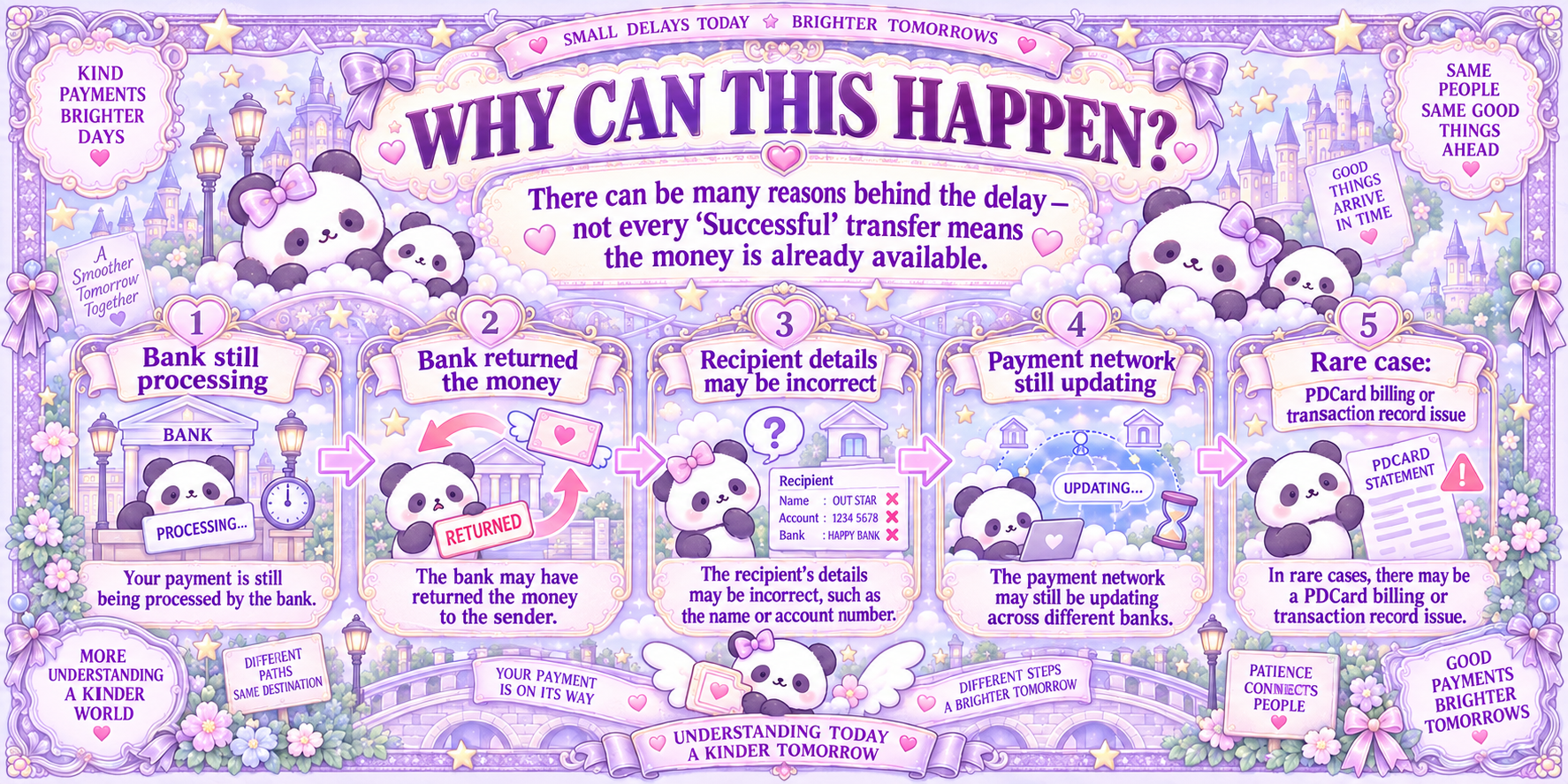
Successful, received and available are not always the same moment.
Depending on the bank and payment method, these stages may happen almost together—or there may be a delay between them.
Use the actual transaction record when checking what happened.
A screenshot showing Successful can help, but it may show only part of the transaction, hide recipient details, show only the sending-side status, come from an older transaction or omit the reference number.
Before contacting Customer Service, read Why You Should Check Your Transaction Records Before Contacting Support.
Confirm the original transaction before assuming the money disappeared.
If your withdrawal appears missing, see Withdrawal Missing? Check Your Transaction History First on PDCard.

The first transfer may simply be delayed.
If you create the same transfer again and the original later arrives, the recipient could receive both payments.
Check
Review the original transaction.
Confirm
Verify the recipient information and reference number.
Ask
If still unclear, contact Customer Service before sending again.
Contact PDCard Customer Service through WhatsApp inside the app.
Prepare the relevant information first so the transaction can be checked directly.
Your PDCard ID.
Transfer amount and transfer time.
Recipient details.
Transaction or reference number and a status screenshot if available.
Customer Service can check whether the transfer is still processing, was returned, has a recipient-detail issue, needs more payment-network processing, or—in a rare case—needs further PDCard-side review.
For support instructions, see How to Contact PDCard Online Support.
Before you send again.
Does “Successful” always mean the recipient has the money?
No. It can mean the sending-side processing completed while the receiving bank or network is still updating.
Can the bank return a successful transfer?
Yes. A receiving bank may reject or return a transfer because of account details, restrictions or other receiving-side conditions.
Should I send the same payment again immediately?
No. Check the original transaction first. If both payments later arrive, the recipient could receive the money twice.
What should I prepare for Customer Service?
Your PDCard ID, amount, time, recipient details, transaction or reference number, and a screenshot if available.
A Successful status is not always the end of the story.
A missing payment can be caused by receiving-bank processing, a returned transfer, incorrect recipient details, payment-network delays or, less commonly, a PDCard transaction-record issue that needs review.
Do not guess and do not send the payment twice. Check the original transaction first. If the money is still missing, contact PDCard Customer Service through WhatsApp inside the app.
Apple gift card trading on PDCard
If you sell Apple gift cards and then request a withdrawal, distinguish the card order from the bank transfer. Check both records and send official support the relevant reference before assuming that a completed trade means the bank has already credited your account.
Related guides: how to sell Apple gift cards in Nigeria and Apple gift card rates and naira value.