How to Sell Gift Cards on PDCard: Apple & Other Cards
Current estimated payouts
Apple gift cards issued in the United States. Face values are in USD. Payout estimates are in Nigerian naira before any applicable fees.
| Card type | US$100 |
|---|---|
| Physical card | ₦131,415.50 |
| Code | ₦126,003.00 |
| E-code | ₦131,415.50 |
Last rate check . Earliest quote expiry (Lagos time).
Confirm your quote in the app before selling. Final payout is determined after review. Get the official PDCard app.
To sell gift cards in Nigeria on PDCard, check the rate in the app, choose your gift card brand, country and format, enter the amount, then review the quote before submitting your card. Select a supported category that matches your card.
Check the Apple quote before following the app steps
For an Apple trade, identify the exact USA card category before using the tutorial below. The payout by denomination and the total payout are different numbers; review both before you submit.
Match the Apple card’s issuing country, format and face value when checking the current estimate. If several tiers overlap, confirm which category applies in the PDCard app.
Sell Apple gift cards in Nigeria: trading and bulk guide · Apple US$100, US$200 and US$500 Naira payout table. Confirm the correct category and current app quote before submission.
Selling an Apple gift card? Start with Apple gift card rates in Nigeria and how to identify your Apple gift card type. For other brands, learn the difference between physical gift cards and e-codes, then follow the app steps below.
How to Sell Gift Cards on PDCard Nigeria: Gift Card Exchange Trading Guide
Gift cards are useful, but sometimes you may not be able to spend them directly. If you have a gift card and want to turn it into naira, PDCard makes the process simple. You can check your gift card rate, choose your card details, and see how much you may receive before trading.
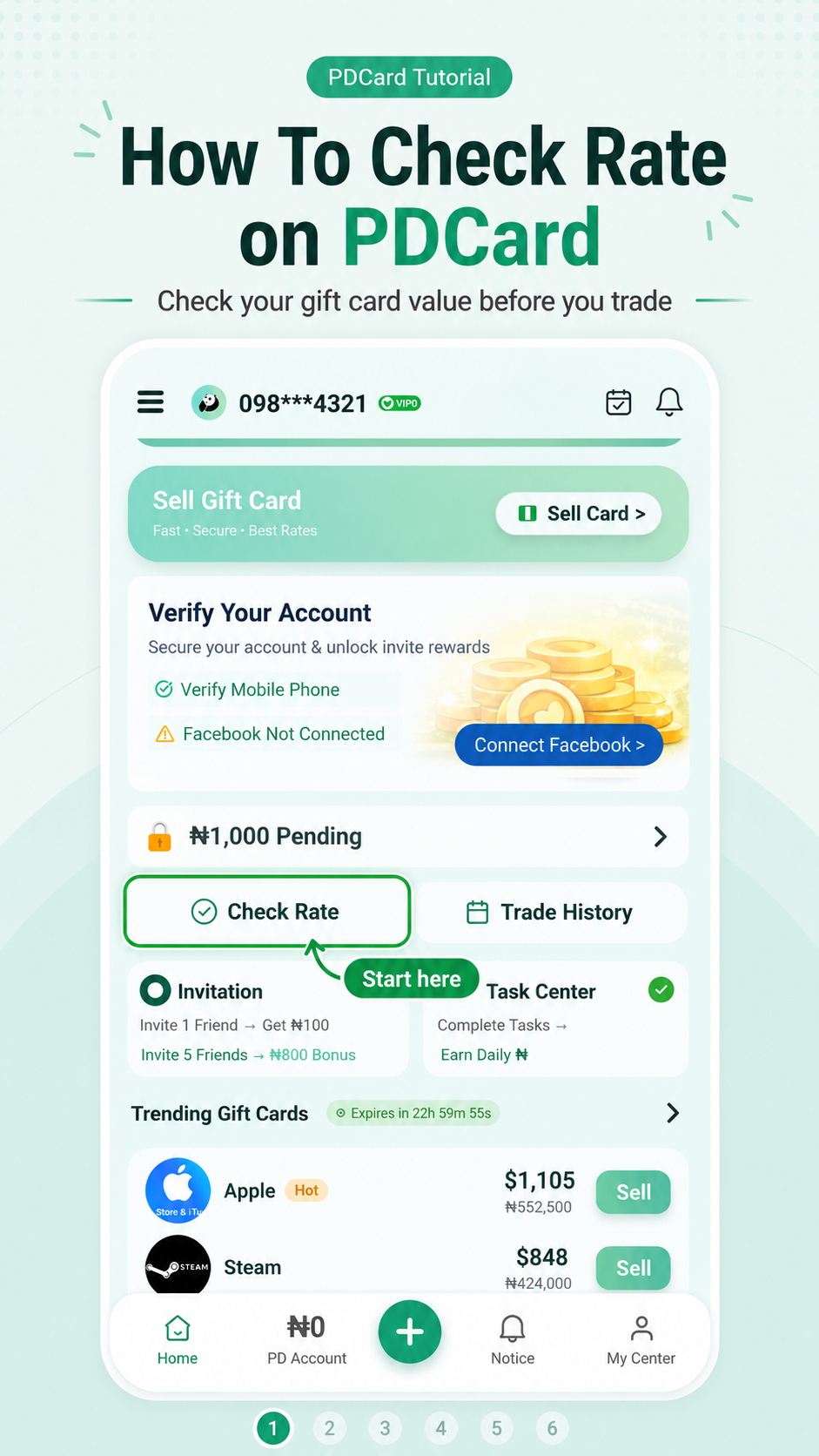
This guide explains how to sell gift cards on PDCard in Nigeria step by step.
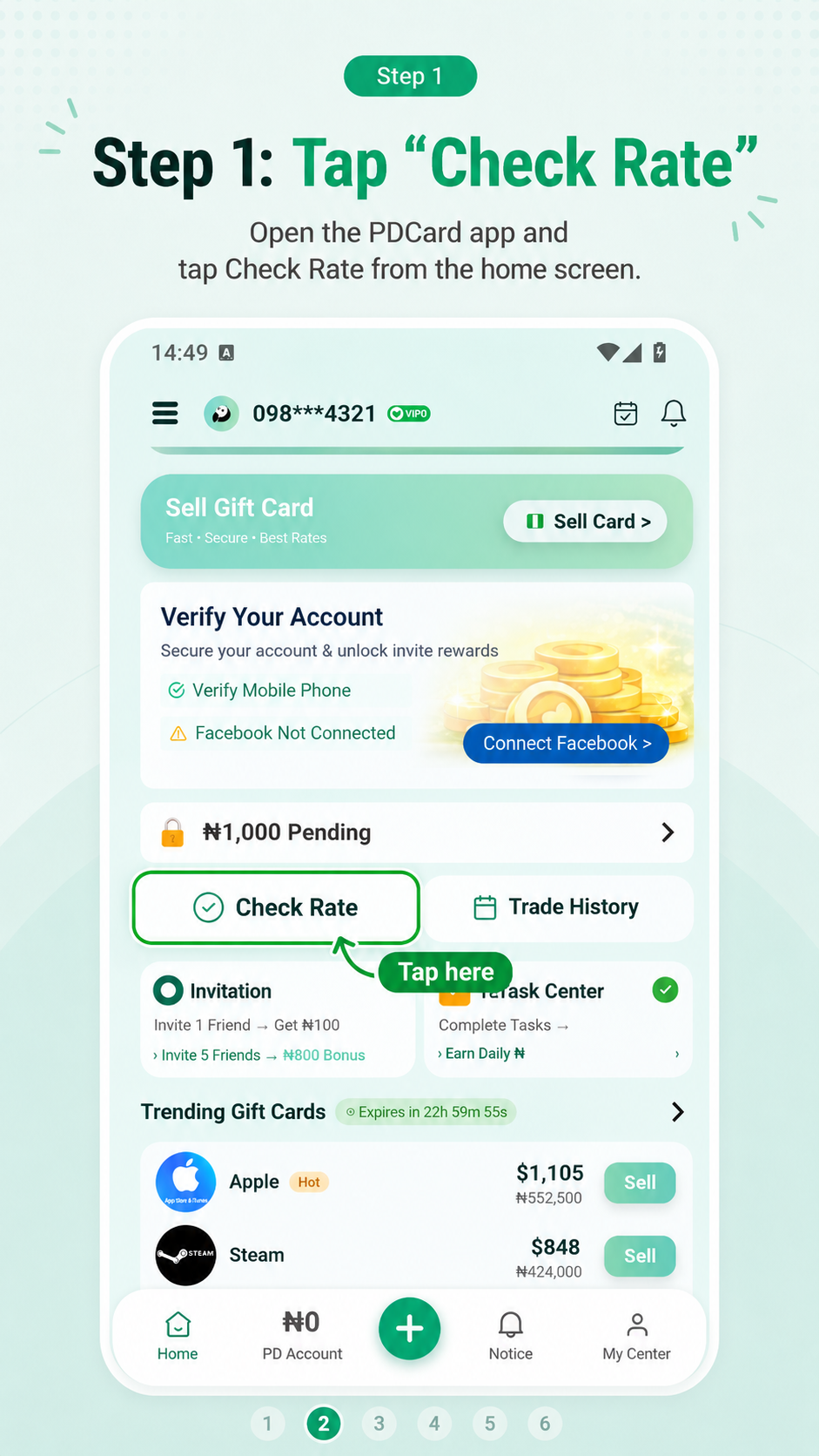
Step 1: Open PDCard and Tap “Check Rate”
After opening the PDCard app, go to the home screen and tap Check Rate.
This is the best place to start because it allows you to confirm your gift card value before you trade. Instead of guessing the rate, you can check directly inside the app.
Checking the rate first helps you understand what your card may be worth before you continue.
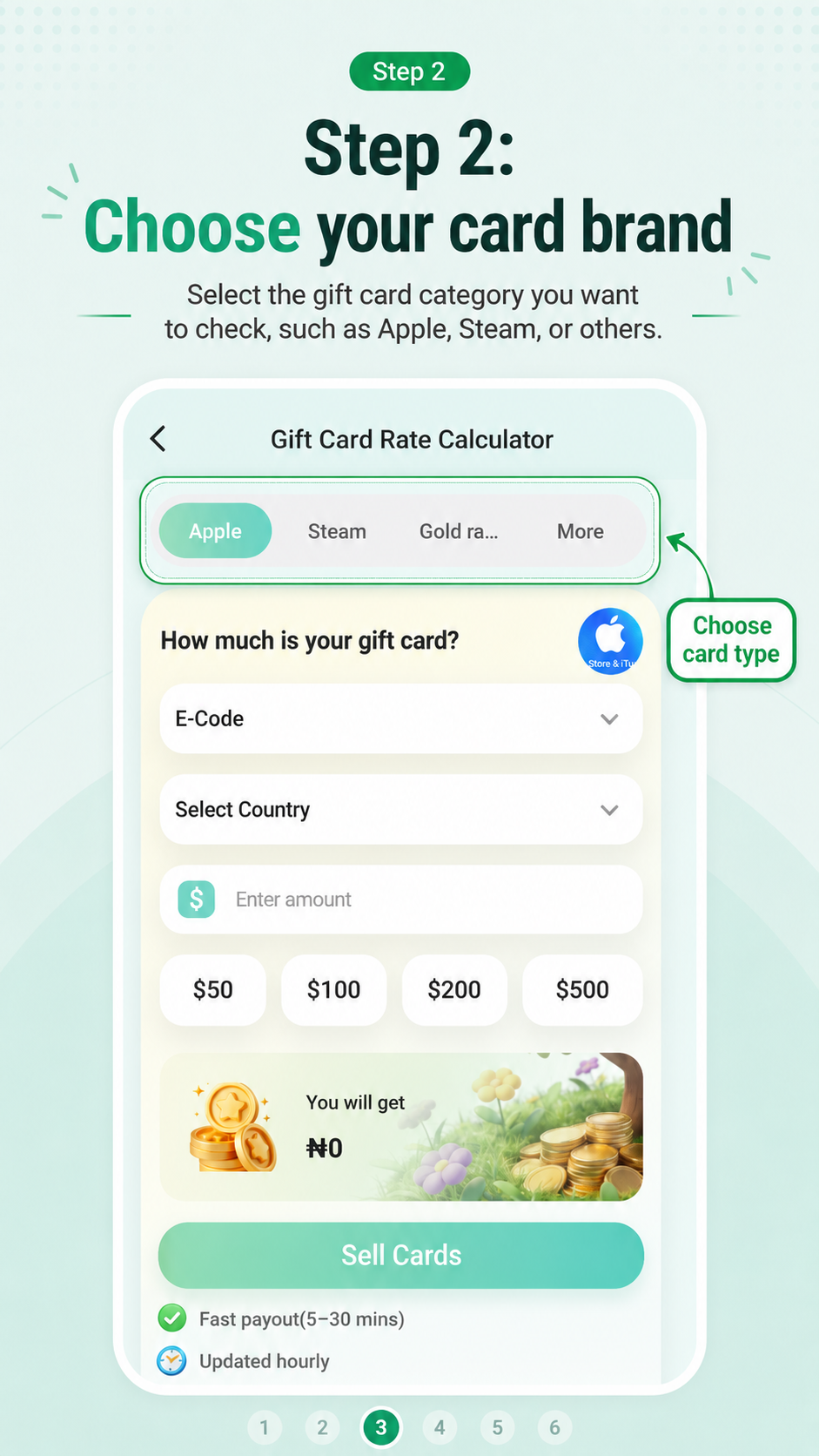
Step 2: Choose Your Gift Card Brand
Next, select the gift card brand you want to check.
PDCard supports different gift card categories such as:
- Apple Gift Card
- Steam Gift Card
- Google Play Gift Card
- Razer Gift Card
- Amazon Gift Card
- Other available card types in the app
Make sure you choose the correct brand. Different gift card brands may have different rates, so selecting the right card type is important.
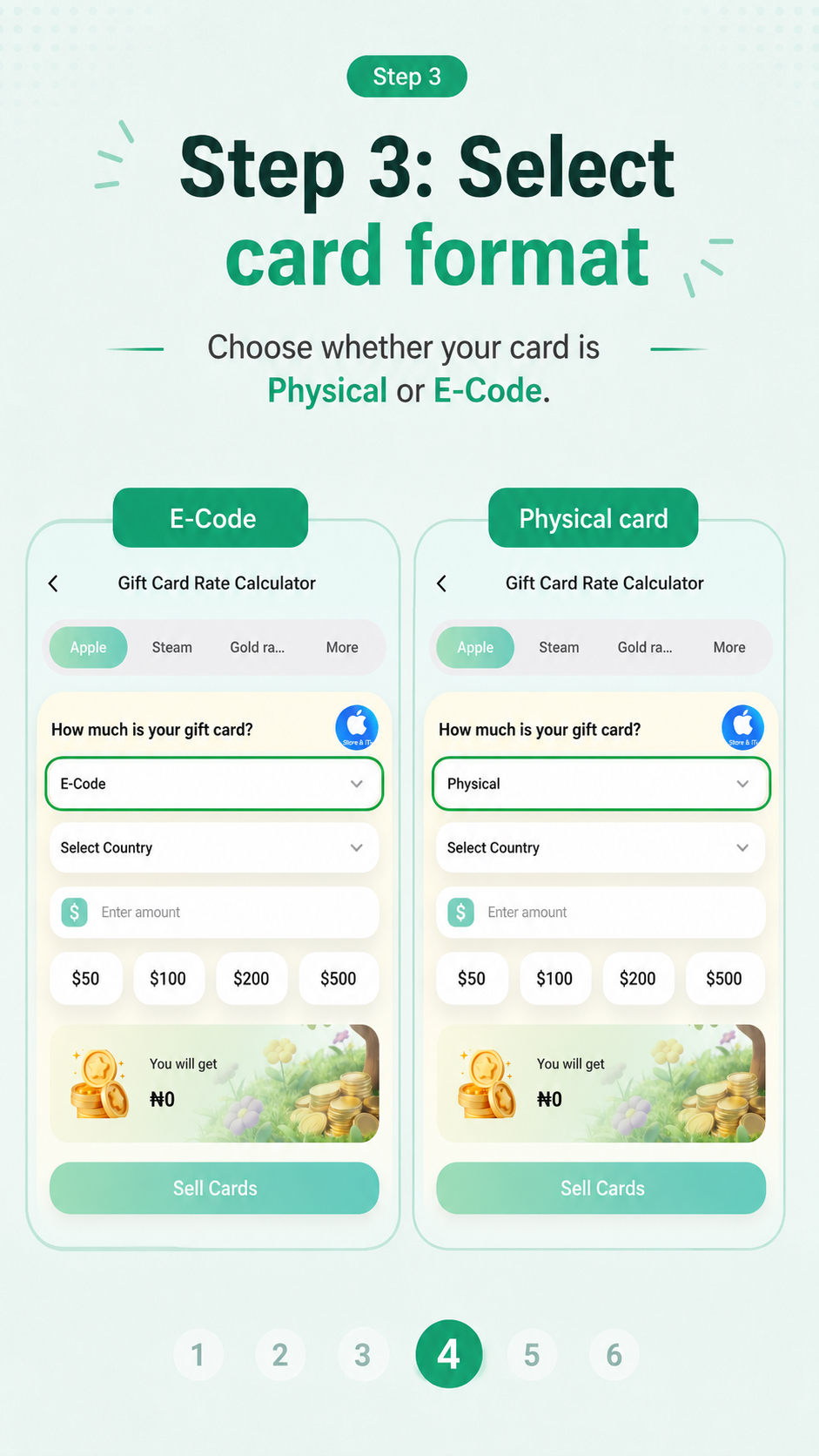
Step 3: Select Your Card Format
After choosing the gift card brand, select the format of your card.
Your gift card may be:
- E-Code: a digital code received through email, message, or receipt
- Physical Card: a real card that you can hold and upload as an image
Choosing the correct format helps the app calculate your card properly. Some cards may have different rates depending on whether they are physical cards or e-codes.
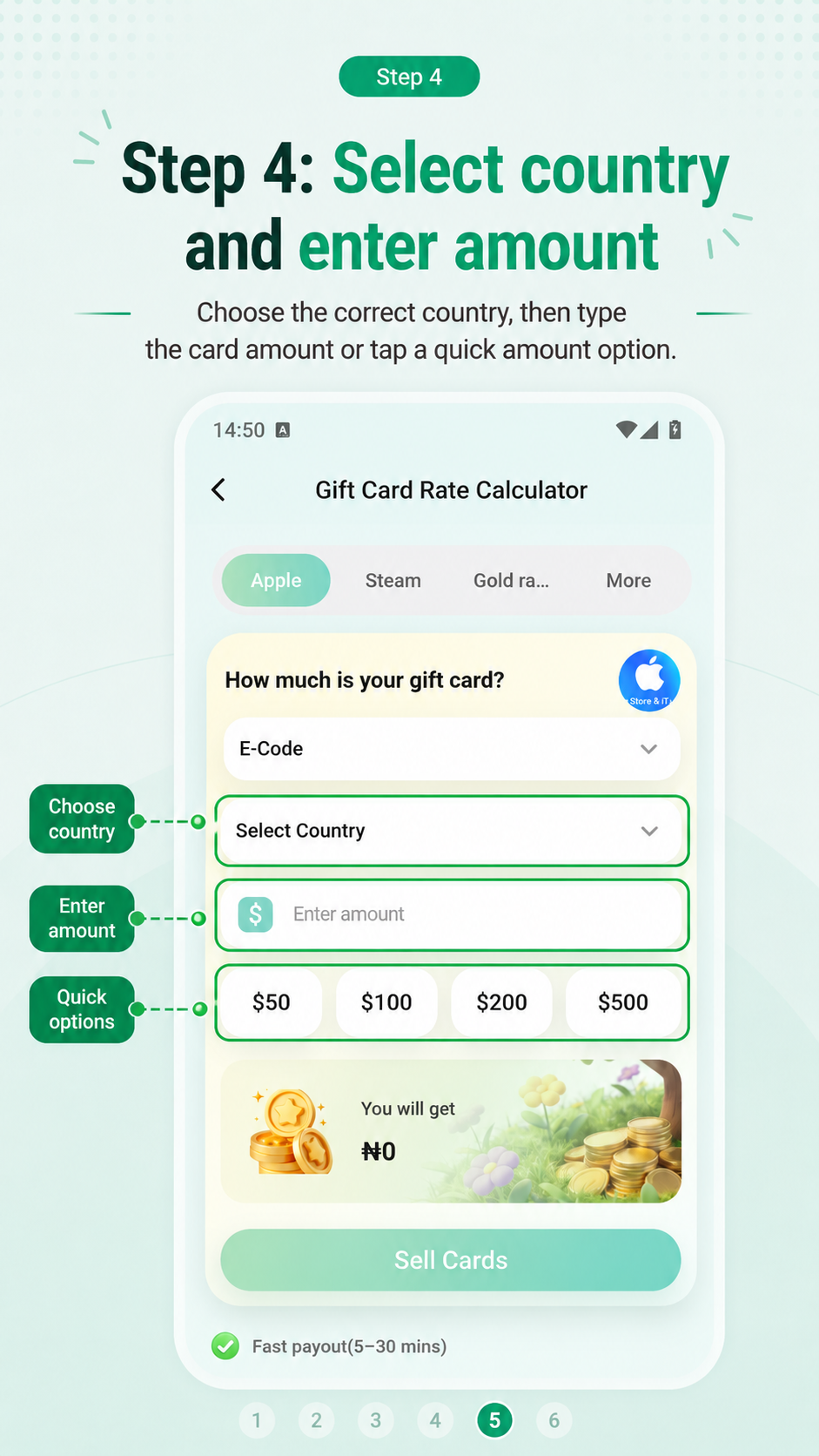
Step 4: Select Country and Enter Amount
Now choose the correct country or region of your gift card, then enter the card amount.
For example, some gift cards may look similar but belong to different countries. A card from the United States may not have the same rate as a card from another region.
After selecting the country, enter the value of the card. You can type the amount manually or choose one of the quick amount options shown in the app, such as $50, $100, $200, or $500.
This step helps PDCard calculate your estimated payout more accurately.
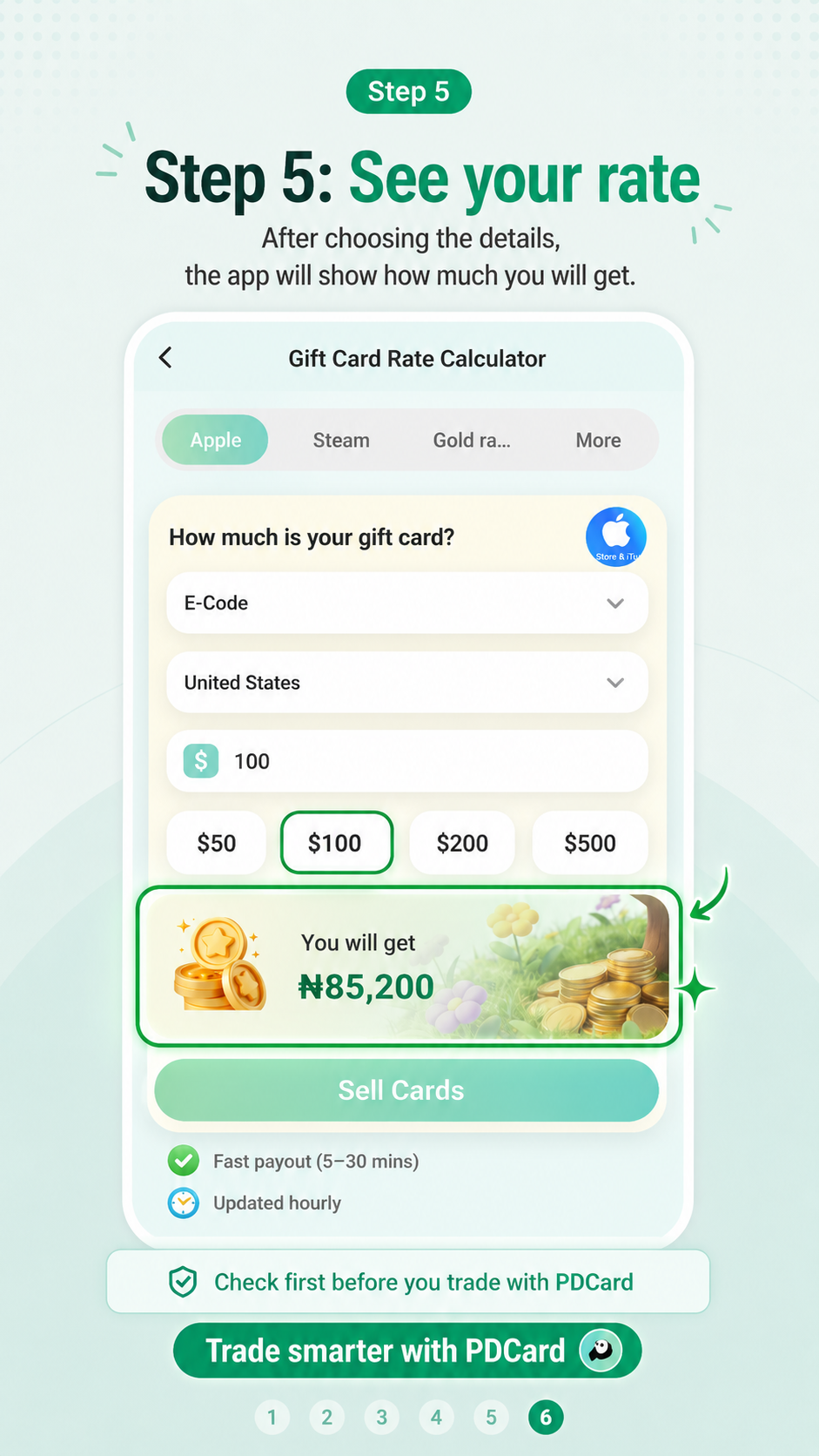
Step 5: See Your Rate Before Trading
Once you have entered the card details, PDCard will show the amount you may receive.
This lets you review the rate before making a decision. You can check your card value first, compare the details, and continue only when you are ready.
After confirming the rate, you can proceed with the trade through the app.
Why You Should Check Your Gift Card Rate First
Gift card rates can change based on card type, country, format, value, and market demand. That is why checking first is important.
When you check your rate before trading, you can:
- Know the estimated naira value of your gift card
- Avoid guessing the rate
- Understand your card details better
- Trade with more confidence
- Reduce mistakes before submitting your card
PDCard is designed to make gift card trading clearer and easier for users in Nigeria.
FAQ: Selling Gift Cards on PDCard
1. What is PDCard?
PDCard is a gift card trading app that allows users in Nigeria to check gift card rates and sell supported gift cards for naira.
2. How do I check my gift card rate on PDCard?
Open the PDCard app, tap Check Rate, choose your card brand, select the card format, choose the country, enter the amount, and the app will show your estimated rate.
3. Why do I need to select the country of my gift card?
Gift card rates may be different depending on the country or region of the card. Selecting the correct country helps the app calculate the rate more accurately.
4. What is the difference between E-Code and Physical Card?
An E-Code is a digital gift card code usually received by email, message, or receipt. A Physical Card is a real gift card that usually needs to be uploaded as a clear image.
5. Can I sell Apple Gift Cards on PDCard?
Yes, Apple Gift Cards are one of the common gift card types users can check and trade on PDCard, depending on the available card options in the app.
6. Can I see how much I will receive before trading?
Yes. PDCard allows you to check the estimated amount before continuing with the trade.
7. Why does my gift card rate change?
Gift card rates can change because of card type, card value, card country, card format, and current market conditions. It is better to check the rate inside the app before trading.
8. Is it better to check rate before submitting my card?
Yes. Checking the rate first helps you understand the value of your card and avoid confusion before submitting your trade.
Trade Smarter With PDCard
If you have a gift card and want to know its naira value, start by checking the rate on PDCard. Choose your card brand, select the correct format, enter the card details, and see your estimated payout before you trade.
Check first before you trade with PDCard.
Download PDCard today and trade your gift cards smarter.
Article Summary
This guide explains how to sell gift cards on PDCard in Nigeria using five simple steps. Users can open the app, tap Check Rate, choose the gift card brand, select the card format, enter the country and amount, then review the estimated payout before trading. Checking the rate first helps users understand their card value, avoid mistakes, and trade with more confidence inside the PDCard app.
KEEP PDCARD CLOSE
Download PDCard
Check real-time exchange rates, submit transfers, track your transactions, and enjoy Naira bank withdrawals on the go.
👉 [ Download for iPhone ] | 👉 [ Download for Android ]
OFFICIAL COMMUNITY
Get Official PDCard Updates
Join our official community channels for daily rate updates, platform announcements, and trading support.
💬 [ WhatsApp ] | 📢 [ Telegram ]
Explore PDCard with a creator video
Prefer a video alongside the app screenshots? Explore this PDCard creator post from Stanley Savvy, then follow the numbered instructions in this article for your own card submission.
Stanley Savvy PDCard creator video
Creator: Stanley Savvy — watch the original TikTok post. Produced in collaboration with PDCard. Any rate or promotion in the video reflects its publication context; confirm the current app quote before trading.