Roblox Gift Card Guide: Code, Credit, PIN & PDCard Trading Requirements
Roblox Gift Card Guide
Roblox Gift Card Guide: Code, Credit, PIN & PDCard Trading Requirements
A Roblox gift card can look simple, but the result depends on the product, the redeemable code, activation status and what happens after redemption. If you want to trade it on PDCard, there are also two important eligibility checks to make before submitting.
Interactive Visual Guide
Check the code, value and card status before you trade.
Use the visual guide to identify the Roblox product, check the redeemable code, understand Credit vs Robux, and confirm whether the card currently matches PDCard trading requirements.
Prefer the full-screen version? Open the Visual Guide →
In this guide
Before assuming a Roblox gift card is invalid, identify the exact product and the exact result you are seeing. A mistyped code, an incorrect identifier, an activation issue or value already added to a Roblox account can produce very different results.
01
Why Is My Roblox Gift Card Code Not Working?
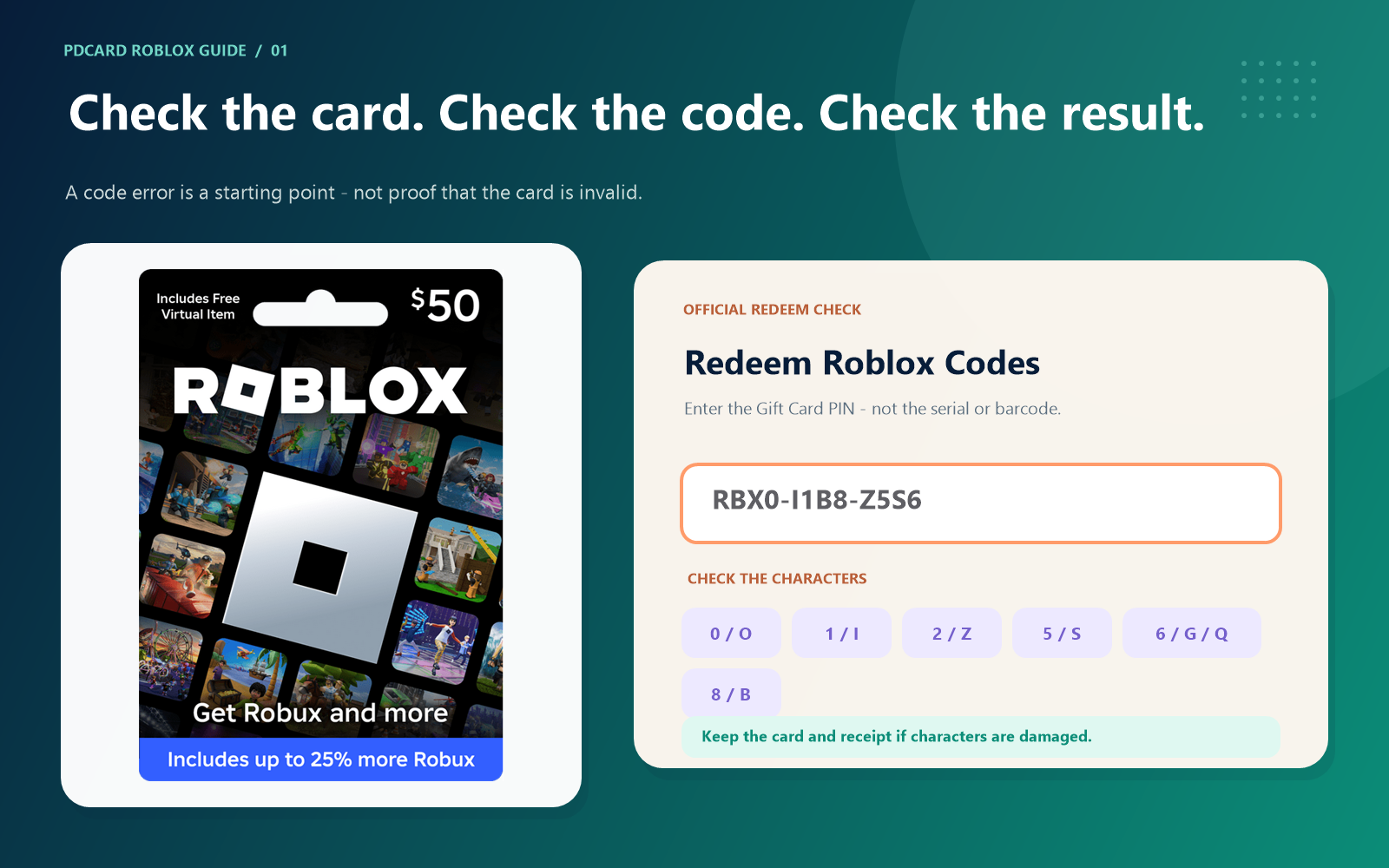
Not every code problem means the gift card itself is invalid. Start by checking whether the redeemable code was copied exactly as printed.
Characters can be easy to confuse when the print is small or the scratch layer has damaged part of the code.
Make sure you are checking the redeemable code
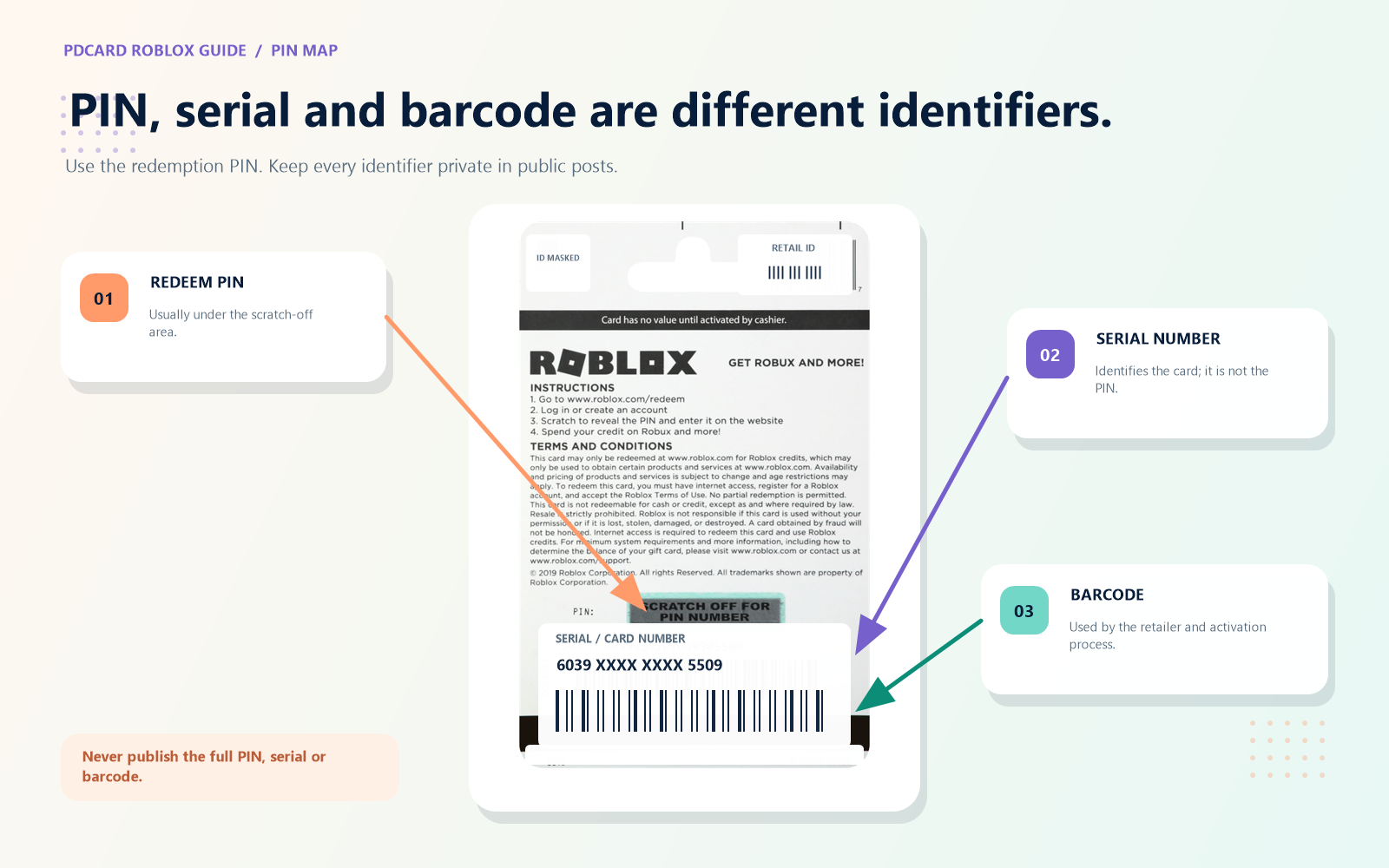
A physical Roblox gift card can contain several identifiers. The redeemable PIN, serial number and barcode may appear near each other, but they do not serve the same purpose.
Entering a serial number or barcode number when the redeemable PIN is required can lead to the wrong result.
If you are preparing the card for PDCard trading, there is another important check: currently eligible Roblox codes must begin with RI, RB or RE.
PDCard code check
Look at the beginning of the redeemable Roblox code. For Roblox cards currently accepted for trading on PDCard, the prefix must begin with RI, RB or RE.
Check activation and keep the receipt
A physical card normally needs to be activated at checkout. If the code is clear but the card appears not to work, keep the purchase receipt because it may help confirm the retailer, purchase date, amount and activation record.
Do not publish the full code.
Mask sensitive characters in public screenshots or group messages. Share complete information only through the appropriate secure process when required.
02
Roblox Gift Card vs Robux: What Is the Difference?
A Roblox Gift Card is the product you redeem. Depending on the product and redemption flow, the value may first appear as Roblox Credit and then be used for Robux or another eligible purchase.
Gift Card → Roblox Credit → Robux or eligible purchase
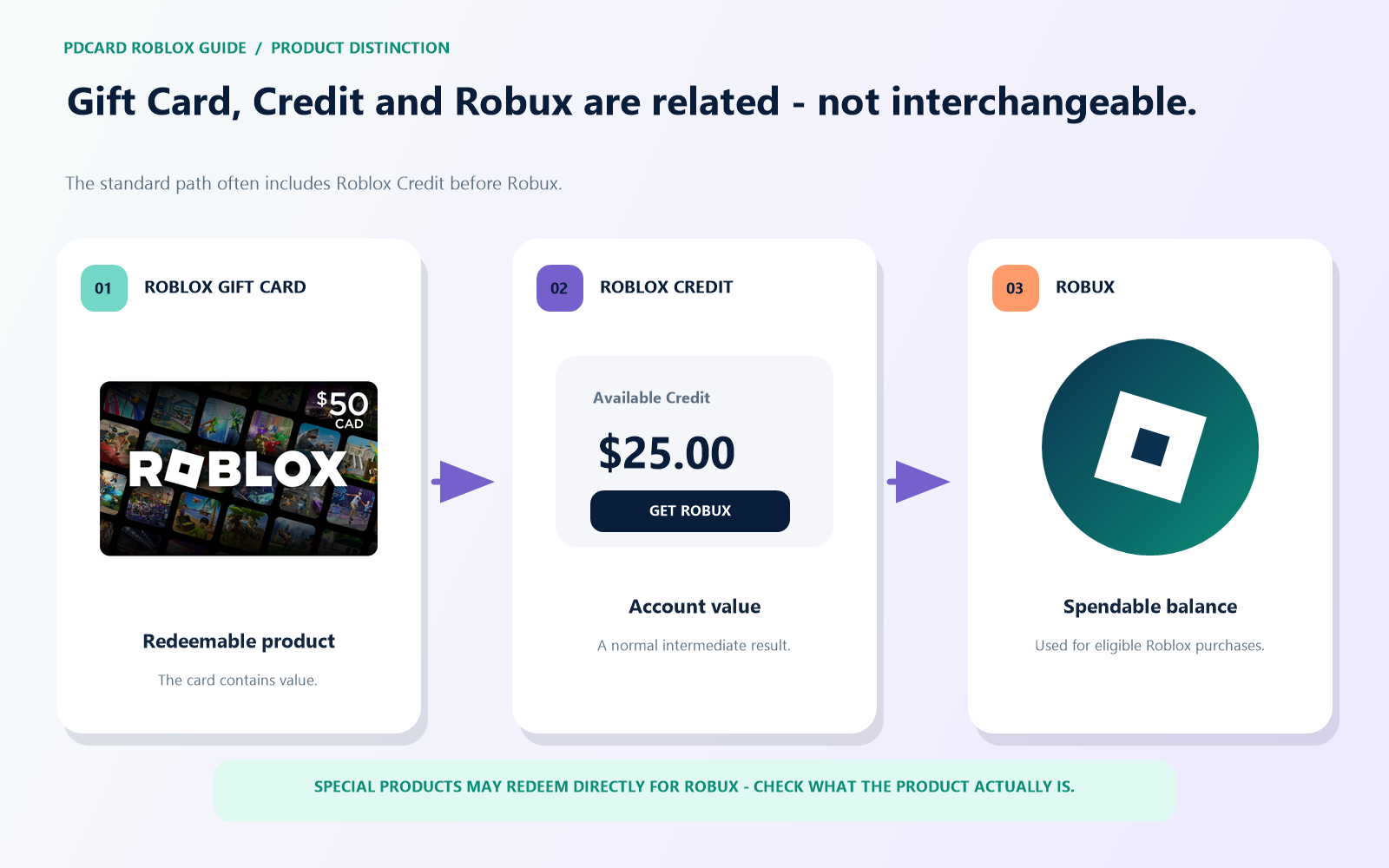
Some Roblox products may be sold as a direct Robux amount, while others are denominated in currency. Identify the exact product from the printed value and product information instead of relying only on the Roblox logo.
03
Why Did My Roblox Gift Card Add Credit Instead of Robux?
Receiving Credit can be a normal result of redeeming a currency-denominated Roblox Gift Card. It does not automatically mean the code failed.
Before redemption
Unused gift card
A physical card or digital code that has not yet been added to a Roblox account.
After redemption
Account Credit / Robux
Value already associated with a Roblox account and no longer an unused gift card.
For PDCard users, this distinction matters. An unused Roblox gift card is different from value that has already been added to an account.
04
Where Is the PIN on a Roblox Gift Card?
On many physical cards, the redeemable PIN is protected by a scratch-off area on the back. Scratch gently so the printed characters remain readable.
Digital gift cards normally provide the redeemable code in the delivery email or order details.
If you need to photograph the card
- Use bright, even lighting and avoid glare.
- Keep the card flat and the camera parallel to it.
- Make the denomination and relevant card information readable.
- Do not publish the complete redeemable code publicly.
05
Check the Roblox Gift Card Country, Currency and Product
Roblox gift cards may appear in different currencies, denominations and product formats. These details can matter when identifying the exact product or preparing the card for trading.
Check the printed denomination, currency, purchase information and product terms rather than relying only on the card design.
Use the actual card information.
Do not change the denomination, round the value or choose another product category simply because it appears available in the app.
06
Which Roblox Gift Cards Does PDCard Currently Accept?
Before submitting a Roblox Gift Card on PDCard, check two specific details: the beginning of the redeemable code and the printed card value.
Check 01
Code starts with RI / RB / RE
The eligible redeemable code must begin with RI, RB or RE.
Check 02
No decimal value
The denomination must be a whole amount with no value after the decimal point.
Check the code prefix
Look at the first characters of the redeemable Roblox code.
If the redeemable code begins with another prefix, do not change or edit the code to make it fit an available category.
Check the denomination
The card value should be a whole amount. There should be no additional value after the decimal point.
Matches the rule
10 / 25 / 50 / 100
Whole-number denomination.
Does not match the rule
10.50 / 25.99 / 50.75
Contains a value after the decimal point.
Do not round the value.
If a card shows a decimal denomination, do not round it up or down just to match an available PDCard category. Submit only information that matches the actual card.
07
Before Trading a Roblox Gift Card on PDCard
Check eligibility before creating the transaction. This helps prevent avoidable submissions that do not match the current Roblox trading requirements.
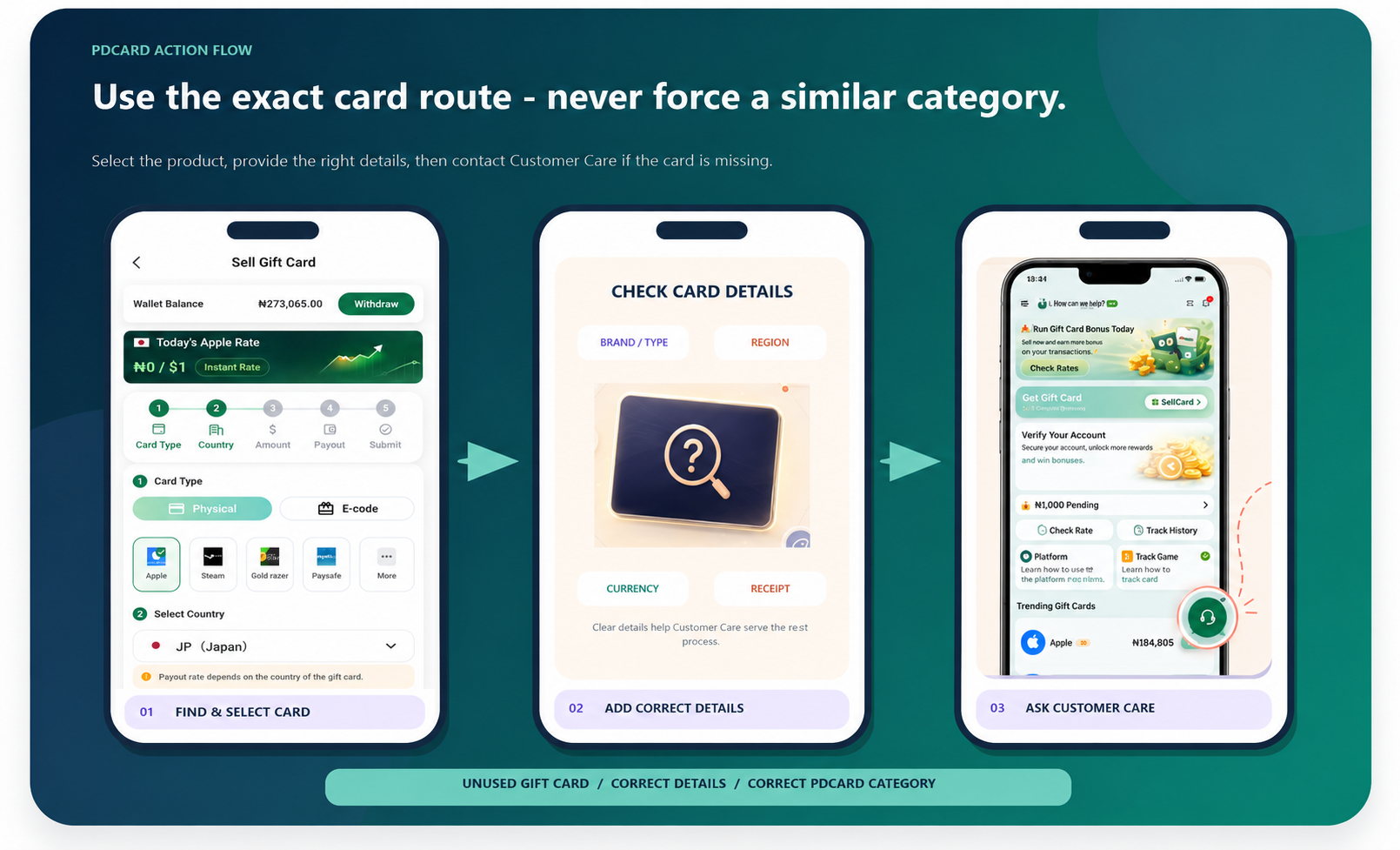
- Check the code prefix. The redeemable code must begin with RI, RB or RE.
- Check the denomination. The card value must be a whole amount without digits after the decimal point.
- Identify the exact Roblox product. Confirm that you are working with the correct gift card or eligible Roblox product.
- Confirm the card is unused. Do not submit value that has already been added to a Roblox account.
- Check the redeemable code carefully. Do not confuse the PIN with a serial number or barcode.
- Keep the purchase receipt. It may support retailer, denomination or activation checks.
- Prepare clear card images. Make the relevant product information readable.
- Select the matching PDCard category. Do not alter the code, denomination or product information just to fit another available category.
08
Quick Roblox Gift Card Checklist
- My redeemable code begins with RI, RB or RE.
- My card denomination is a whole amount with no value after the decimal point.
- I identified the redeemable code correctly.
- I did not use the serial number or barcode as the code.
- The card is unused.
- The denomination matches what I selected on PDCard.
- I kept the receipt and clear card images.
- I checked everything before submitting.
Final takeaway
Check the prefix and value before you submit.
For Roblox Gift Cards currently accepted on PDCard, start with two checks: the redeemable code should begin with RI, RB or RE, and the denomination should be a whole amount with no value after the decimal point. Then confirm the card is unused, the code is correct and the selected PDCard category matches the actual card.
09
Stay Connected with PDCard
Download the PDCard app for gift card trading, or join the official community groups for updates, guides and announcements.
Apple gift card trading on PDCard
Roblox credit and Apple gift cards have different redemption and trading requirements. If you want to sell Apple gift cards as well, select Apple separately and check the issuing country, format and current quote.
Related guides: how to sell Apple gift cards in Nigeria and Apple gift card rates and naira value.